
KiCad Like a Pro 3e – eBook
-
eBook status1 Lecture
-
00 - Front matter5 Lectures
-
01 - Getting started with PCB design6 Lectures
-
02 – Getting started with KiCad12 Lectures
-
Introduction
-
KiCad Project Manager (main window)
-
Overview of the individual KiCad apps
-
Paths and Libraries
-
(Legacy) KiCad Project Manager (main window)
-
(Legacy) Overview of the individual KiCad apps
-
(Legacy) Paths and Libraries
-
Create a new project from scratch
-
Create a new project from a template
-
KiCad on Mac OS, Linux, Windows
-
(Legacy) Kicad 6 on Mac OS, Linux, Windows
-
(Legacy) Major Differences between KiCad 6.0 and 5.0
-
Introduction
-
03 - Project: A hands-on tour of KiCad - Schematic Design11 Lectures
-
Introduction to schematic design
-
Quick intro to the design workflows
-
The finished KiCad project and directory
-
Start Kicad and create a new project
-
1 - Start Eeschema, setup Sheet
-
2 - Add symbols
-
3 - Arrange, annotate, associate
-
4 - Wiring
-
5 - Nets
-
6 - The Electrical Rules Check
-
7 - Comments with text and graphics
-
Introduction to schematic design
-
04 - Project: A hands-on tour of KiCad - Layout10 Lectures
-
Introduction to layout design and objective of this section
-
1 - Start Pcbnew, import footprints
-
2 - Outline and constraints (edge cut)
-
3 - Move footprints in place
-
4 - Route (add tracks)
-
5 - Refine the outline
-
6 - Silkscreen (text and graphics)
-
7 - Design rules check
-
8 - Export Gerbers and order
-
The manufactured PCB
-
Introduction to layout design and objective of this section
-
05 - Design principles and PCB terms16 Lectures
-
06 - PCB design workflows17 Lectures
-
The KiCad Schematic Design Workflow
-
Schematic Design Step 1: Setup
-
Schematic Design Step 2: Symbols
-
Schematic Design Step 3: AAA (Arrange, Annotate, Associate)
-
Schematic Design Step 4: Wire
-
Schematic Design Step 5: Nets
-
Schematic Design Step 6: Electrical Rules Check
-
Schematic Design Step 7: Comments and Graphics
-
The KiCad Layout Design Workflow
-
Layout Design Step 1: Setup
-
Layout Design Step 2: Outline and constraints
-
Layout Design Step 3: Place footprints
-
Layout Design Step 4a: Route
-
Layout Design Step 4b: Copper fills
-
Layout Design Step 5: Silkscreen
-
Layout Design Step 6: Design rules check
-
Layout Design Step 7: Export & Manufacture
-
The KiCad Schematic Design Workflow
-
07 - Fundamental Kicad how-to: Symbols and Eeschema17 Lectures
-
About this section
-
Left toolbar overview
-
Top toolbar overview
-
Right toolbar overview
-
Schematic editor preferences
-
How to find a symbol with the Chooser
-
How to find schematic symbols on the Internet
-
How to install symbol libraries in bulk
-
How to create a custom symbol
-
How to associate a symbol with a footprint
-
Net labels
-
Net classes
-
Hierarchical sheets
-
Global labels
-
Hierarchical labels and import sheet pin
-
Electrical rules and customization
-
Bulk editing of schematic elements
-
About this section
-
08 - Fundamental Kicad how-to: Footprints and Pcbnew31 Lectures
-
Introduction
-
Left toolbar overview
-
Top toolbar overview
-
Top toolbar Row 1
-
Top toolbar Row 2
-
Right toolbar overview
-
Right toolbar main buttons
-
Right toolbar overview - Appearance
-
Layout editor preferences (Preferences window, PCB Editor)
-
Board Setup
-
Board Setup - Board Stackup
-
Board Setup - Text & Graphics
-
Board Setup - Design Rules and net classes
-
Board Setup - Design Rules - Custom Rules and violation severity
-
How to find and use a footprint
-
Footprint sources on the Internet
-
How to install footprint libraries
-
Filled zones
-
Keep-out zones
-
Interactive router
-
Length measuring tools
-
Bulk editing
-
Create a custom footprint, introduction
-
Create a new library and footprint
-
Create a custom footprint, 1, Fabrication layer
-
Create a custom footprint, 2, Pads
-
Create a custom footprint, 3, Courtyard layer
-
Create a custom footprint, 4, Silkscreen layer
-
Use the new footprint
-
Finding and using a 3D shape for a footprint
-
How to export and test Gerber files
-
Introduction
-
09 - Project: Design a simple breadboard power supply PCB23 Lectures
-
Introduction
-
Schematic design editing
-
Schema 1 - Setup
-
Schema 2 - Symbols
-
Edit Component values
-
Schema 3 - Arrange, Annotate
-
Schema 3 - Associate
-
Schema 4 - Wiring
-
Schema 5 & 6 - Nets and Electrical Rules Check
-
Schema 7 - Comments
-
Introduction to layout editing
-
Layout 1 - Setup
-
Layout 2 - Outline and constraints
-
Layout 3 - Place footprints
-
Layout 2 supplemental - Refine outline
-
Layout 4 - Routing
-
Layout 5 - Copper fills
-
Layout 6 - Silkscreen
-
Layout 7 - Design Rules Check
-
Layout 8 - Export and Manufacture
-
Finding and correcting a design defect
-
Fix the schematic
-
Fix the layout
-
Introduction
-
10 - Project: A 4 x 8 x 8 LED matrix array clock25 Lectures
-
Project - Introduction
-
Schematic design
-
Schema 1 - Setup
-
Schema 2 - Symbols
-
Schema 3 - Arrange, Annotate
-
Schema 3 - Associate
-
Schema 4 - Wiring
-
Schema 5 - Nets
-
Schema 6 - Electrical Rules Check
-
Schema 7 - Comments
-
Schema - Last-minute edits
-
Layout design
-
Layout 1 - Setup
-
Layout 2 - Outline and constraints
-
Layout 3 - Place components
-
Layout 2 - Refine outline
-
Layout 3 - Move footprints to back layer
-
Layout 4 - Route
-
Layout 4 - Copper fills
-
Layout 5 - Silkscreen
-
Layout 6 - Design Rules Check
-
Layout 7 - Manufacture
-
Bonus - 3D shapes
-
Bonus - Found a bug in the schematic! (and fix)
-
The assembled and working PCB
-
Project - Introduction
-
11 - Project: MCU datalogger with build-in 512K EEPROM and clock37 Lectures
-
Project - Introduction
-
Create the new project and create new Git repository
-
Schematic design
-
Schema 1 - Setup
-
Schema 2 - Symbols
-
Schema 2 - Sheet 2
-
Schema 3 - Arrange, Annotate
-
Edit Component values
-
Schema 3 - Associate
-
Schema 4 - Wiring of sheet 1
-
Schema 4 - Wiring of sheet 2
-
Schema 5 - Nets
-
Schema 6 - Electrical Rules Check
-
Schema 7 - Comments
-
Git, setup in a 2-layer PCB branch
-
Layout design
-
Layout 1 - Setup
-
Layout 2 - Outline and constraints
-
Layout 3 - Place components
-
Layout 2 - Outline refinement
-
Layout 4 - Route
-
Layout 4 - Copper fills
-
Layout 4 - Routing improvements
-
Layout 5 - Silkscreen
-
Layout 4 - Routing violations and complete silkscreen
-
Layout 6 - Design Rules Check
-
Layout 7 - Manufacture
-
3D shapes
-
Merge 2-layer branch to main
-
Design 4 Layer PCB in new Git branch
-
Four-layer PCB routing
-
Four-layer PCB manufacturing
-
Updating layout from changes to the schematic with Git
-
Finding and correcting a design defect
-
Fix the schematic
-
Fix the 2 layer PCB layout
-
Fix the 4 layer PCB layout
-
Project - Introduction
-
12 - Project: An ESP32 clone25 Lectures
-
Project - Introduction
-
Schema 1 - New KiCad project and Schematic Setup
-
Schema 2 - Symbols
-
Schema 3 - Annotate and set component values
-
Schema 3 - Arrange
-
Schema 3 - Associate
-
Schema 4 - Wiring
-
Schema 5 - Nets and Net Classes
-
Schema 6 - Electrical Rules Check
-
Schema 7 - Comments
-
Layout - Introduction
-
Layout 1 - Setup
-
Layout 2 - Outline and constraints
-
Layout 3 - Place components
-
Layout 2 supplemental - refine outline
-
Layout 4 - Route
-
Layout 4 - Copper fills and keep out areas
-
Layout 5 - Silkscreen
-
Layout 4 - Routing improvements
-
Layout 6 - Design Rules Check
-
Layout 7 - Manufacture
-
3D shapes
-
Finding and correcting a design defect
-
Fix the schematic
-
Fix the layout
-
Project - Introduction
-
13 - Recipes56 Lectures
-
How to create a custom graphic
-
Change a symbol in bulk
-
Change a footprint in bulk
-
Interactive delete
-
Find and Replace (Eeschema)
-
Edit Text & Graphics Properties
-
Edit Track & Via Properties (Pcbnew)
-
Text variables
-
Board Setup - pre-defined sizes for tracks and vias
-
Board Setup - Design rules violation severity
-
Board Setup - Custom design rules
-
Schematic Setup - Electrical Rules and violation severity
-
Schematic Setup - Electrical Rules and Pin conflicts map
-
Field name templates
-
Bill of Materials method 1: Pcbnew
-
Bill of Materials method 2: Eeschema
-
Bill of Materials method 3: Interactive HTML BOM plugin
-
Import components from Snapeda
-
The Freerouting autorouter introduction
-
Install and start FreeRouting on MacOS
-
Install and start FreeRouting on Linux Kubuntu
-
Install and start FreeRouting on Windows
-
How to use the Freerouting autorouter 2-layer example
-
How to use the Freerouting autorouter 4-layer example
-
Pcbnew Inspection menu
-
Single-track and differential pair routing
-
Track length tuning
-
Differential pair skew tuning
-
Interactive router modes
-
The footprint wizard
-
Pin and wire highlighter tool
-
Pcbnew Origins
-
How to create custom sizes for tracks and vias
-
KiCad project management with Git
-
Install Git
-
Git configuration
-
Create a new KiCad project Git repository
-
How to ignore files with Gitignore
-
Basic Git commands: add, commit, log, diff
-
Basic Git commands: branch
-
Basic Git commands: merge
-
Sharing your KiCad project on GitHub
-
How to customize the editor color scheme
-
How to import an EAGLE, Altium, or Cadstar project
-
The circuit simulator
-
Prepare the circuit for simulation
-
Configure the simulator
-
Simulate
-
Import a KiCad 5 project
-
KiCad project templates
-
Use a system project template
-
Create a user project template
-
Archive/un-archive and share a project
-
How to use buses
-
Calculate the width of a trace
-
Design a custom schematic sheet
-
How to create a custom graphic
-
14 - What's new in KiCad 714 Lectures
-
Introduction
-
14.2. Text and text boxes
-
14.3. Plugin and Content Manager: Plugins
-
14.4. Plugin and Content Manager: Libraries
-
14.5. Plugin and Content Manager: Themes
-
14.6. Drag and drop
-
14.7. Command Line Interface
-
14.8. Orthogonal dragging
-
14.9. PDF export improvements
-
14.10. PCB editor - Unroute selected route
-
14.11. PCB editor - Automatically complete trace route
-
14.12. Search panel
-
14.13. Improved Pack & Move footprints
-
14.14. More information and documentation about KiCad 7
-
Introduction
-
XX – Content by contributing authors4 Lectures
Quick intro to the design workflows
This chapter will give an overview of the model design workflow that I use to guide me through the PCB design process.
You can see the model in Figure 3.2.1 below. For a comprehensive discussion, please refer to Part 6 of this book, specifically Chapter One (the KiCad Schematic Design Workflow) and Chapter Two (the KiCad Layout Design Workflow).
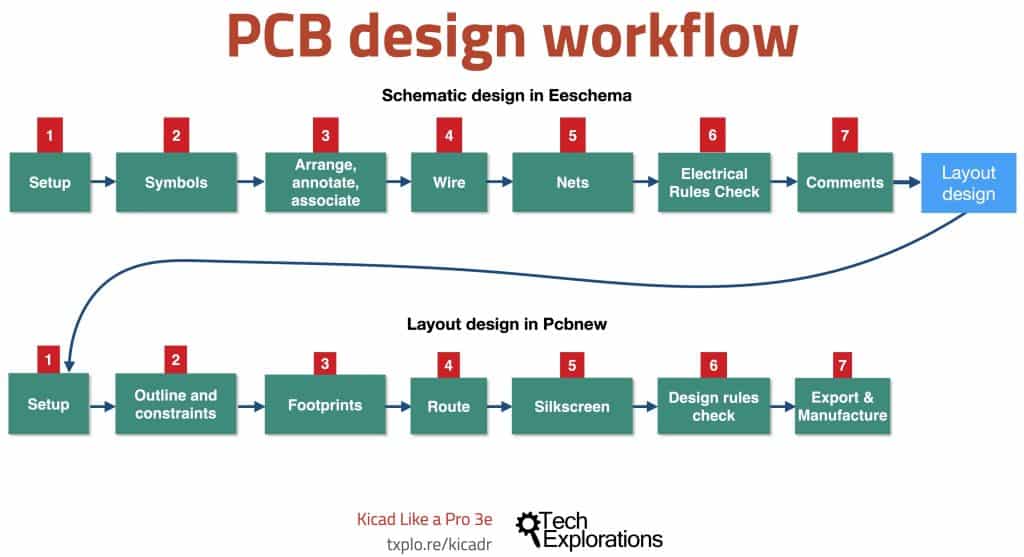
The model consists of two workflows: The Schematic Design Workflow and the Layout Design Workflow. We use Eeschema to create the schematic design and Pcbnew to create the layout design.
Throughout this first project, I will be referencing the steps you see in 3.2.1; you may want to bookmark this page to jump back here when you need to quickly.
As you can see, work begins in Eeschema. The schematic design workflow consists of 7 distinct steps, which you can complete linearly, one after the other. In real life, it is more common than not to iterate through these steps as needed. For example, you may need to change the wirings in step 4 after finding electrical errors in step 6.
When you complete the schematic design, you will continue with the layout design workflow using Pcbnew. Again, the layout design workflow consists of another seven distinct steps, which you can complete linearly. As with the schematic design workflow, real-life progression is typically iterative. It is common for a designer working in the layout design to jump to a much earlier step in the schematic design editor to fix a design bug, add new components, rewire, at make a change that affects the layout.
In this first book project, I will keep the workflows as linear as possible to reduce the overall complexity and improve your learning outcomes.
In Figure 3.2.2 (below), you can see a detailed depiction of the schematic design workflow. This depiction provides details about some of the tasks that we complete in each step.
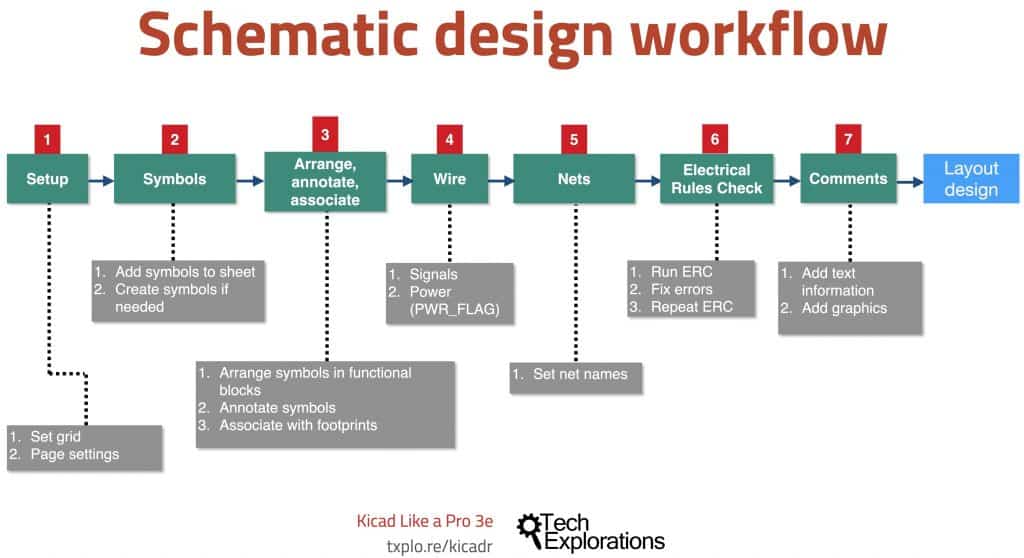
For example, you can see that in step four, you will draw the signal and power wires, while in step 5, you will set the names of the various nets. I will be helping you through each of the tasks in these seven steps through the project.
Similarly, in Figure 3.2.3 (below) you can see a detailed depiction of the layout workflow:
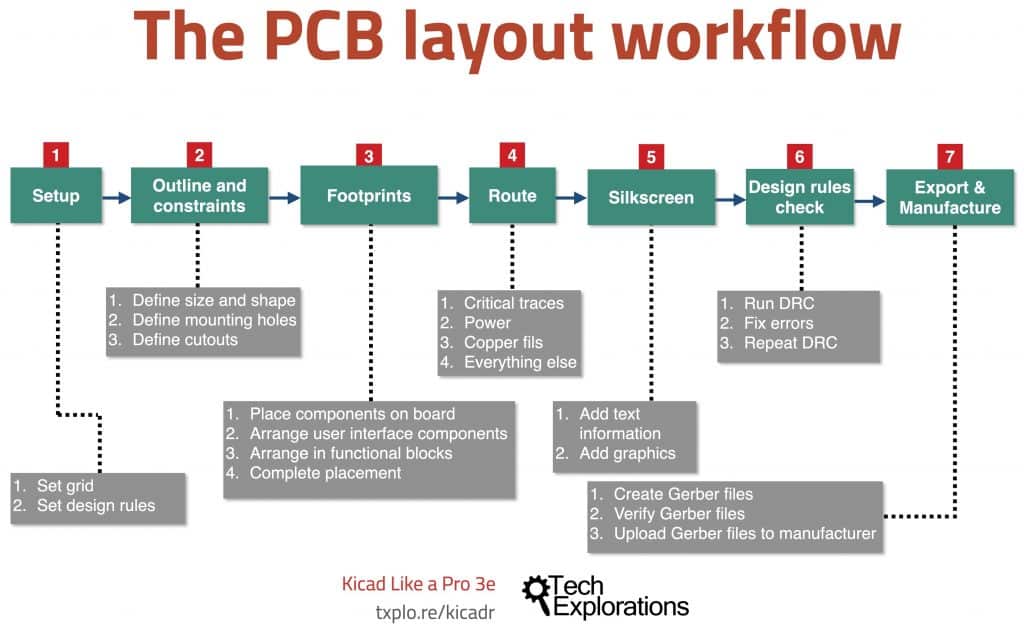
We will use the workflow in Figure 3.2.3 in Part 4 of this book which covers the layout workflow for this first project.